在Windows/ MacOS 用過Logitech Option,
對它在工作上的幫助跟實用性印象深刻,
可以自訂義按鈕的功能,也可以設定手勢操作。
但Logitech 並沒有在Linux 作業系統上發行相關的軟體,
因此在上網找了解決方案並測試成功後,寫下文件供後續參考用。
Logiops
Logitech 滑鼠、鍵盤的非官方驅動程式,
目前僅與HID ++> 2.0 設備相容。
相容設備清單
Compatible Devices
依賴套件
Logiops 需要依賴cmake, libevdev, libudev與libconfig,
以下提供幾個Linux發行版的安裝方式:
Arch Linux: sudo pacman -S cmake libevdev libconfig pkgconf
Debian/Ubuntu: sudo apt install cmake libevdev-dev libudev-dev libconfig++-dev
Fedora: sudo dnf install cmake libevdev-devel systemd-devel libconfig-devel gcc-c++
Gentoo Linux: sudo emerge dev-libs/libconfig dev-libs/libevdev dev-util/cmake virtual/libudev
Solus: sudo eopkg install libevdev-devel libconfig-devel libgudev-devel
安裝Logiops
- Clone Github Repository and into logiops dir
1
2
| git clone https://github.com/PixlOne/logiops.git
cd logiops
|
- Build instructions
1
2
3
4
5
6
| sudo apt-get install build-essential
mkdir build
cd build
cmake ..
make
sudo make install
|
- Create a System Daemon Service file
create file sudo vim /etc/systemd/system/logid.service with the content
1
2
3
4
5
6
7
8
9
10
11
| [Unit]
Description=Logitech Configuration Daemon
[Service]
Type=simple
ExecStart=/usr/local/bin/logid -c /etc/logid.cfg
User=root
#ExecReload=/bin/kill -HUP $MAINPID
[Install]
WantedBy=multi-user.target
|
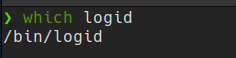
這裡需要注意的是ExecStart這行的logid路徑
可以用以下指令確認路徑:
- Create configuration file
- Configure the driver file
以下設定內容是針對MX Master 2S, M720 Triathlon的設定,
設備完整的名稱可參考上述的相容設備清單
1
2
3
4
5
6
7
8
9
10
11
12
13
14
15
16
17
18
19
20
21
22
23
24
25
26
27
28
29
30
31
32
33
34
35
36
37
38
39
40
41
42
43
44
45
46
47
48
49
50
51
52
53
54
55
56
57
58
59
60
61
62
63
64
65
66
67
68
69
70
71
72
73
74
75
76
77
78
79
80
81
82
83
84
85
86
87
88
89
90
91
92
93
94
95
96
97
98
99
100
101
102
103
104
105
106
107
108
109
110
111
112
113
114
115
116
117
118
119
120
121
122
123
124
125
126
127
128
129
130
131
132
133
134
135
136
137
138
139
140
141
142
143
144
145
146
147
148
149
150
151
152
153
154
155
156
157
158
159
| # this config file is for Logiops and needs to be placed in /etc/logid.cfg
devices: (
{
name: "Wireless Mouse MX Master 2S"; # 參考相容設備清單
smartshift:
{
on: true; # Smartshift 功能開啟
threshold: 15; # 觸發閾值
default_threshold: 30; # 預設閾值
};
hiresscroll: # HiRes(高解析) 滾輪
{
hires: true;
invert: false;
target: false;
};
thumbwheel:
{
divert: true;
invert: false;
}
dpi: 1000; # 鼠標移動的DPI
buttons: (
{
cid: 0xc3; # 拇指鍵CID
action =
{
type: "Gestures"; # 手勢操作
gestures: (
{
direction: "Up"; # 拇指鍵 + 滑鼠上移
threshold: 7;
mode: "OnRelease";
action =
{
type: "Keypress"; # 按下拇指鍵並下移,觸發Ctrl + Alt + 方向鍵上
keys: ["KEY_LEFTCTRL", "KEY_LEFTALT", "KEY_UP"];
};
},
{
direction: "Down"; # 拇指鍵 + 滑鼠下移
threshold: 7;
mode: "OnRelease";
action =
{
type: "Keypress"; # 按下拇指鍵並下移,觸發Ctrl + Alt + 方向鍵下
keys: ["KEY_LEFTCTRL", "KEY_LEFTALT", "KEY_DOWN"];
};
},
{
direction: "Left"; # 拇指鍵 + 滑鼠左移
mode: "OnRelease";
action =
{
type: "Keypress"; # 按下拇指鍵並下移,觸發Ctrl + Alt + 方向鍵左
keys: ["KEY_LEFTCTRL", "KEY_LEFTALT", "KEY_LEFT"];
};
},
{
direction: "Right"; # 拇指鍵 + 滑鼠右移
mode: "OnRelease";
action =
{
type: "Keypress"; # 按下拇指鍵並下移,觸發Ctrl + Alt + 方向鍵右
keys: ["KEY_LEFTCTRL", "KEY_LEFTALT", "KEY_RIGHT"];
}
},
{
direction: "None" # 單點拇指鍵
mode: "OnRelease";
action =
{
type: "Keypress"; # 單點拇指鍵,觸發Windows鍵
keys: ["KEY_LEFTMETA"];
}
}
);
};
},
{
cid: 0xc4; # Smartshift切換鍵CID
action =
{
type = "ToggleSmartshift"; # 切換Smartshift
};
}
);
},
{
name: "M720 Triathlon Multi-Device Mouse";
hiresscroll:
{
hires: true;
invert: false;
target: false;
};
dpi: 1000;
buttons: (
{
cid: 0xd0;
action =
{
type: "Gestures";
gestures: (
{
direction: "Up";
threshold: 7;
mode: "OnRelease";
action =
{
type: "Keypress";
keys: ["KEY_LEFTCTRL", "KEY_LEFTALT", "KEY_UP"];
};
},
{
direction: "Down";
threshold: 7;
mode: "Onrelease";
action =
{
type: "Keypress";
keys: ["KEY_LEFTCTRL", "KEY_LEFTALT", "KEY_DOWN"];
};
},
{
direction: "Left";
mode: "Onrelease";
action =
{
type: "Keypress";
keys: ["KEY_LEFTCTRL", "KEY_LEFTALT", "KEY_LEFT"];
};
},
{
direction: "Right";
mode: "Onrelease";
action =
{
type: "Keypress";
keys: ["KEY_LEFTCTRL", "KEY_LEFTALT", "KEY_RIGHT"];
};
},
{
direction: "None";
mode: "OnRelease";
action =
{
type: "Keypress";
keys: ["KEY_LEFTMETA"];
};
}
)
}
}
)
}
);
|
MX Anywhere 3
1
2
3
4
5
6
7
8
9
10
11
12
13
14
15
16
17
18
19
20
21
22
23
24
25
26
27
28
29
30
31
32
33
34
35
36
37
38
39
40
41
42
43
44
45
46
47
48
49
50
51
52
53
54
55
56
57
58
59
60
61
62
63
64
65
66
67
68
69
70
71
72
73
74
75
| devices: (
{
name: "MX Anywhere 3";
smartshift:
{
on: true;
threshold: 15;
default_threshold: 30;
};
hiresscroll:
{
hires: true;
invert: false;
target: true;
up: {
mode: "Axis";
axis: "REL_WHEEL_HI_RES";
axis_multiplier: 3;
},
down: {
mode: "Axis";
axis: "REL_WHEEL_HI_RES";
axis_multiplier: -3;
}
};
dpi: 1000;
buttons: (
{
cid: 0xc4;
action =
{
type: "Gestures";
gestures: (
{
direction: "Up";
mode: "OnRelease";
action =
{
type: "Keypress";
keys: ["KEY_LEFTMETA", "KEY_A"];
};
},
{
direction: "Left";
mode: "Onrelease";
action =
{
type: "Keypress";
keys: ["KEY_LEFTCTRL", "KEY_LEFTALT", "KEY_LEFT"];
};
},
{
direction: "Right";
mode: "Onrelease";
action =
{
type: "Keypress";
keys: ["KEY_LEFTCTRL", "KEY_LEFTALT", "KEY_RIGHT"];
};
},
{
direction: "None";
mode: "OnRelease";
action =
{
type: "Keypress";
keys: ["KEY_LEFTMETA"];
};
}
)
}
}
)
}
);
|
- 設定Service Startup 與Service Start
1
2
| sudo systemctl enable logid
sudo systemctl start logid
|
- 驗證服務是否成功開啟
1
2
3
| sudo systemctl is-active logid # 驗證服務是否啟用
sudo systemctl is-enabled logid # 驗證startup狀態
sudo systemctl is-failed logid # 驗證startup狀態
|
參考文件:
Logiops Github
Ask Ubuntu